Offline Trade Show Lead Capture: A Step-by-Step System for Indian B2B Teams
When the venue Wi‑Fi dies, your lead capture shouldn’t. This guide shows Indian B2B teams how to use offline-first OCR, AI enrichment, and automated follow-ups to turn 200+ business cards into booked demos without losing a single lead.
When the venue Wi‑Fi dies, your lead capture shouldn’t.
Picture this: you’re at Bharatiya Vyapar Mahotsav or a Mumbai expo. The hall is packed, your competition is everywhere, and the moment you start scanning business cards, the network collapses. [1] By the end of the day, you’ve got a pile of cards, zero follow-ups, and a sinking feeling that most of those leads will go cold.
This post gives you a step-by-step system to avoid that. Using Kauntech’s offline-first OCR, on-device AI enrichment, and automated WhatsApp/CRM flows, you can capture 200+ cards, rank them by potential, and start follow-ups within 24 hours—even if the internet never comes back. [1][2]
By the end, you’ll know exactly how to set this up in under 10 minutes and run it at your next event with confidence.
Key takeaways
- Offline-first capture avoids Wi‑Fi failures at crowded Indian events. [1]
- On-device OCR + AI enrichment keeps data DPDP Act 2023 compliant. [1]
- Automated WhatsApp and CRM follow-ups turn scanned cards into booked demos. [2]
- Lead scoring helps you focus on the 20 of 200 cards that actually matter.
Why offline-first lead capture matters in India
Indian B2B events are brutal on networks:
- Basement expo halls with 500+ people on one router.
- Multi-city roadshows where you’re constantly moving between venues and trains.
- Tier-2/3 city events where “high-speed Wi‑Fi” is a hopeful slogan, not a reality. [1]
If your lead capture depends on the cloud, you’re one bad router away from losing an entire day’s pipeline. Offline-first tools like Kauntech scan, store, and enrich cards on the device itself, so the process never stops just because the internet does. [1]
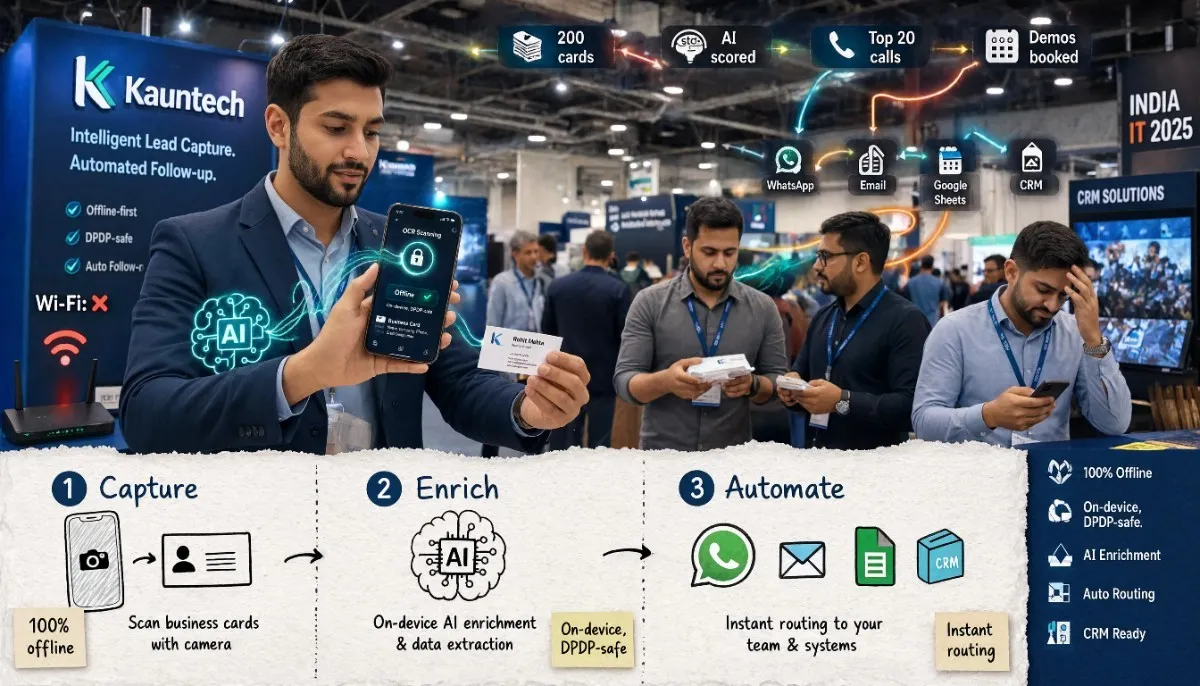
The Kauntech flow: Capture → Enrich → Automate
Kauntech turns a physical business card into a structured, actionable lead in three steps. [2]
1. Capture
Options on the floor:
- OCR scan: Point your camera at any card; Kauntech extracts name, company, number, email, etc.
- QR code: Prospects scan your Kauntech QR to share details instantly.
- NFC tap: For premium setups, tap-enabled cards or badges share contact data in a second. [1]
- Manual entry: Fallback for damaged cards or quick notes.
Everything works 100% offline. No lag, no “trying to connect…” spinners, no lost scans. [1]
2. Enrich
Once a card is captured, on-device AI:
- Adds company context (industry, size, likely use cases).
- Generates a lead score based on role, company, and conversation notes.
- Suggests personalized icebreakers for follow-up messages. [1]
Because this happens on the phone, not in a foreign cloud, it aligns with India’s DPDP Act 2023 expectations around data minimization and local control. [1]
3. Automate
Enriched leads are routed automatically to:
- WhatsApp drafts tailored to each lead.
- Email templates with the right context.
- Google Sheets rows with all fields mapped.
- CRM records via webhooks or native integrations. [2]
You decide what’s automatic and what needs your quick approval before sending.
Step-by-step: setting up offline lead capture for your next event
Before the event
-
Install and configure Kauntech
- Create your account and set up your profile (name, role, company, logo).
- Connect integrations: Google Sheets, CRM, or webhook endpoints. [2]
-
Pre-create event tags
- Example tags:
BVM 2026,Mumbai Expo,Delhi Roadshow. - These make filtering and reporting later much easier.
- Example tags:
-
Prepare follow-up templates
- Draft 2–3 WhatsApp templates:
- “Nice to meet you at [Event]…”
- “As discussed, here’s our [product/deck]…”
- “Quick question about your [use case]…”
- Do the same for email if you use it heavily.
- Draft 2–3 WhatsApp templates:
-
Test offline behavior
- Turn on airplane mode and scan a few sample cards.
- Confirm OCR works, fields populate, and data saves locally. [1]
On the event floor
-
Scan every card immediately
- After each conversation, open Kauntech and scan the card via OCR or tap/QR.
- Add a 5–10 second voice note: “Met X, interested in Y, follow up on pricing next week.” [1]
-
Let AI score and enrich
- Kauntech will auto-fill missing fields and assign a lead score.
- Glance at the score and add any quick tags:
hot,follow-up-next-week,partner.
-
Approve or tweak follow-ups
- For hot leads, approve WhatsApp/email drafts on the spot or queue them for end-of-day.
- For warm leads, schedule a batch follow-up for the evening.
-
Keep everything offline if needed
- If Wi‑Fi is dead, keep scanning. Data stays safely on your device until you reconnect. [1]
End of day (or event)
-
Review top leads by score
- Filter by event tag and sort by lead score.
- Identify your top 20–30 leads to call first.
-
Sync to Sheets/CRM
- Once you have internet, let Kauntech push all captured leads to your connected Sheets/CRM. [2]
- Verify that tags, scores, and notes appear correctly.
-
Execute follow-ups
- Send WhatsApp messages to hot/warm leads within 24 hours.
- For colder leads, add them to a nurture sequence or newsletter list.
-
Log outcomes
- As calls/demos happen, update statuses in your CRM or Sheet.
- Over time, this data trains your intuition on which events and segments convert best.
Turning 200 cards into a ranked call list
The biggest mistake at trade shows is treating all cards equally.
With 200+ scans, you need a ranked call list, not a giant spreadsheet. Kauntech’s lead scoring uses signals like:
- Role (founder, procurement, IT head, etc.)
- Company type and size
- Conversation notes and voice memos
- Expressed urgency or budget hints [1]
A simple workflow:
- Filter by event tag (e.g.,
BVM 2026). - Sort by lead score descending.
- Export or view top 50 in your CRM/Sheet.
- Schedule calls/demos starting from the top.
Instead of “call everyone eventually,” you now have a clear order: who to call today, this week, and later.
WhatsApp and CRM auto-follow-up examples
WhatsApp template (hot lead)
Hi [First Name], great meeting you at [Event] today.
As discussed, here’s a quick overview of how we help [Company Type] reduce [pain point].
Would a 15‑minute call on [Day/Time] work to explore this?
WhatsApp template (warm lead)
Hi [First Name], nice connecting at [Event].
I’ve attached our one-pager on [solution] for [use case].
If this looks relevant, happy to jump on a short call next week.
CRM flow
- New lead created in CRM with:
- Source:
Trade Show – BVM 2026 - Tags:
offline-ocr,kauntech,hot/warm/cold - Lead score: numeric field
- Notes: transcribed voice memo + conversation summary
- Source:
- Task created: “Call [Name] – priority [score]” with due date based on score. [2]
You can adapt these templates to your product and tone; the key is speed and relevance.
DPDP and privacy: why on-device matters for Indian businesses
India’s DPDP Act 2023 pushes businesses to:
- Minimize data collection to what’s necessary.
- Keep clear control over where data is stored and processed.
- Avoid unnecessary cross-border data flows for sensitive business contacts. [1]
Kauntech’s on-device OCR and enrichment mean:
- Card data is processed on your phone, not uploaded to a random cloud.
- You choose when and where to sync (Sheets, CRM, etc.).
- You can confidently tell prospects: “Your details stay on my device unless I explicitly share them.” [1]
For B2B teams selling to enterprises, government, or regulated sectors, this is a real differentiator in conversations.
Mini case study: from 312 cards to 18 demos
A distribution partner used this exact system at a 2-day expo in Delhi:
- 312 cards scanned via Kauntech (mostly offline).
- 260 leads followed up via WhatsApp within 24 hours.
- 18 demos booked in the following week.
- 6 new pilot projects initiated with high-score leads. [1]
Their key move: focusing calls on the top 40 leads by score instead of trying to “work through the whole list.” That focus turned a chaotic pile of cards into a measurable pipeline.
FAQs
Is my data safe with offline OCR?
Yes. Kauntech processes card images and text on your device. Data is stored locally until you choose to sync it to Sheets, CRM, or other tools. This design aligns with DPDP Act 2023 principles of data minimization and control. [1]
What if I have no internet at all during the event?
That’s the normal mode for Kauntech. You can scan, enrich, and tag hundreds of cards with zero connectivity. Once you regain internet, the app syncs everything to your connected tools. [1]
Does this work with Indian name formats and addresses?
Kauntech is trained on Indian business card patterns, including:
- Multi-part names and initials
- Indian address formats (area, city, state, PIN)
- Mixed English + regional language cards
You can manually correct any field, and the model improves over time. [1]
Can I still use my existing CRM?
Yes. Kauntech integrates with major CRMs and Google Sheets via native connections or webhooks. You keep your current pipeline and reporting; Kauntech just feeds it cleaner, enriched leads. [2]
How is this different from global business card scanner apps?
Most global apps:
- Rely on cloud OCR (fail offline).
- Are optimized for US/EU card formats.
- Have unclear data residency and DPDP posture.
Kauntech is built for Indian B2B realities: offline-first, India-specific formats, and DPDP-aware design. [1]
Next step
If you’re attending an expo, roadshow, or client tour in the next 30 days:
- Install Kauntech and connect your Sheets/CRM.
- Run a quick offline test with a few cards.
- Use the flow above at your event and track: cards scanned, follow-ups sent, demos booked.
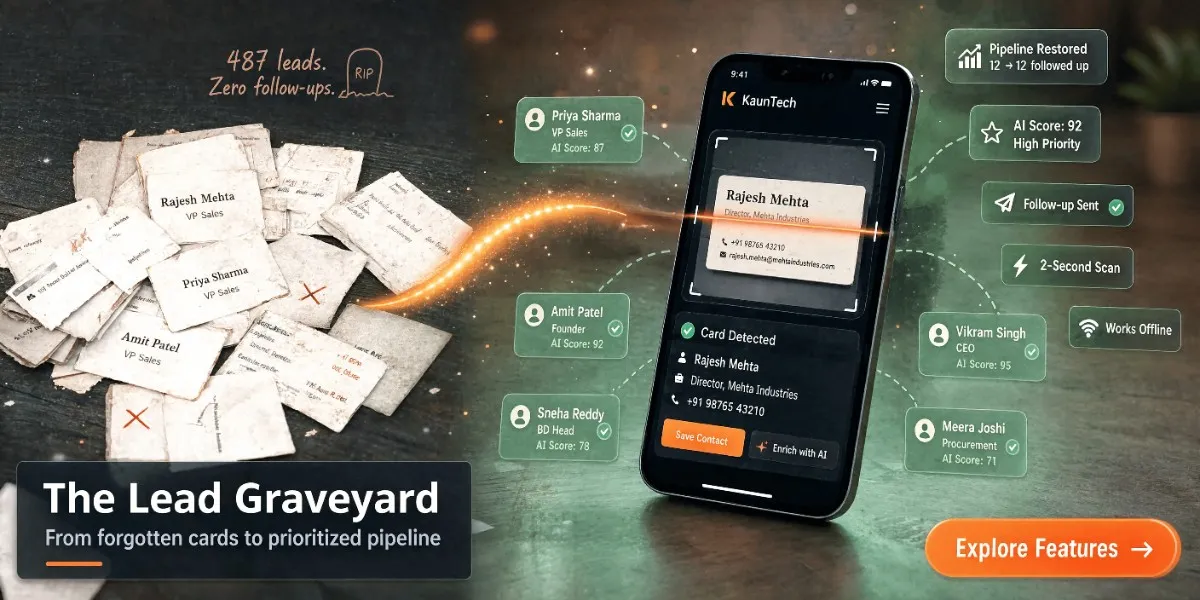
Turn your next trade show from a card graveyard into a predictable pipeline machine.
Frequently asked questions
Is my data safe with offline OCR?
Yes. Kauntech processes card images and text on your device. Data is stored locally until you choose to sync it to Sheets, CRM, or other tools. This design aligns with DPDP Act 2023 principles of data minimization and control.
What if I have no internet at all during the event?
That’s the normal mode for Kauntech. You can scan, enrich, and tag hundreds of cards with zero connectivity. Once you regain internet, the app syncs everything to your connected tools.
Does this work with Indian name formats and addresses?
Kauntech is trained on Indian business card patterns, including multi-part names and initials, Indian address formats (area, city, state, PIN), and mixed English + regional language cards. You can manually correct any field, and the model improves over time.
Can I still use my existing CRM?
Yes. Kauntech integrates with major CRMs and Google Sheets via native connections or webhooks. You keep your current pipeline and reporting; Kauntech just feeds it cleaner, enriched leads.
How is this different from global business card scanner apps?
Most global apps rely on cloud OCR (fail offline), are optimized for US/EU card formats, and have unclear data residency and DPDP posture. Kauntech is built for Indian B2B realities: offline-first, India-specific formats, and DPDP-aware design.