The Lead Graveyard: Why Event Leads Go Cold After You Collect Them
Most businesses do not lose event leads because they lack contacts. They lose them because follow-up is delayed, conversation context disappears, and every lead is treated the same. Learn how Kauntech turns event contacts into prioritized, follow-up-ready opportunities.
The Lead Graveyard: Why Event Leads Go Cold After You Collect Them
A trade show ends.
Your team returns with a stack of business cards, scanned contacts, phone numbers, email addresses, and promising conversations. Everyone feels positive because the event generated many leads.
Then the normal work begins.
The cards go into a drawer. Scanned contacts sit in a spreadsheet. Someone says they will organize the leads later. A salesperson remembers that one prospect was interested, but cannot remember which card belonged to that conversation.
A few days pass.
The first follow-up is delayed. The message becomes generic. High-intent prospects get mixed with casual contacts. Some leads reply, but nobody knows who should respond. Others never hear from the business again.
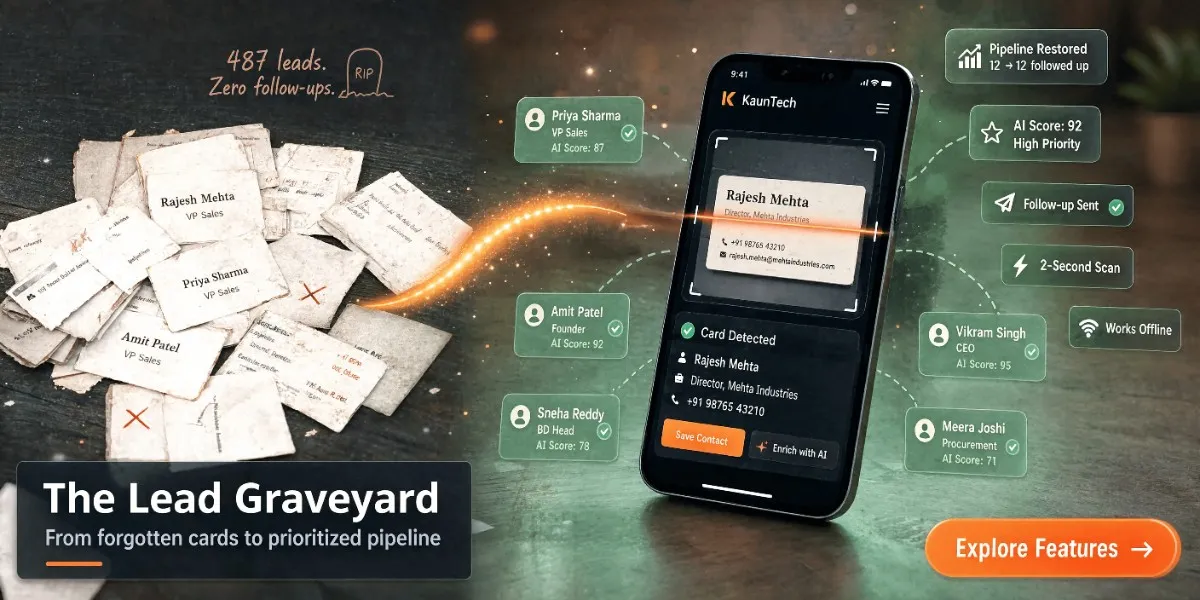
This is the event lead graveyard: a collection of contacts that were captured successfully but never converted into meaningful sales conversations.
The problem is usually not lead generation. It is the gap between capturing a lead and taking the next action.
What Is an Event Lead Graveyard?
An event lead graveyard is a group of business contacts collected at a trade show, exhibition, conference, networking event, or business meeting that receive little or no useful follow-up.
These contacts may exist in:
- Physical business cards.
- Phone contacts.
- Camera galleries.
- QR-code scans.
- WhatsApp chats.
- Google Sheets.
- CRM imports.
- Email inboxes.
- Notes written on paper.
The contact technically exists, but it is not connected to a clear owner, conversation, priority, message, or next action.
That is why collecting more cards does not automatically create more revenue.
A lead becomes commercially useful only when the business can answer:
- Who is this person?
- What does their company do?
- What did we discuss?
- How strong is their potential fit?
- Who should follow up?
- Which channel should we use?
- What should we say?
- When should we contact them?
- What happens after they respond?
Why Event Leads Go Cold
1. Follow-up starts too late
After an event, sales teams have travel, reporting, internal meetings, and routine work. Lead follow-up is often postponed until someone has time to organize the data.
By then, the prospect may have forgotten the conversation. They may have received several messages from competitors. They may no longer remember why they accepted the business card.
A captured lead is not the same as a fresh lead.
The value of event contact data decreases when the first relevant follow-up is delayed.
2. Conversation context disappears
A business card usually contains basic identity information:
- Name.
- Company.
- Job title.
- Phone number.
- Email address.
It does not contain the most valuable part of the meeting:
- The problem the prospect described.
- The product they asked about.
- Their budget or buying timeline.
- The person involved in the decision.
- The specific promise made by the salesperson.
- Their preferred follow-up channel.
Without context, the salesperson has to send a generic message:
"It was nice meeting you at the event. Please let us know if you need anything."
This message is polite, but it gives the prospect no strong reason to reply.
3. Every lead is treated the same
A trade show may produce several different types of contacts:
- A prospect actively searching for a solution.
- A decision-maker comparing vendors.
- A potential partner.
- A supplier.
- A student or job seeker.
- A casual visitor.
- Another exhibitor.
- A contact who only wanted a brochure.
If all of these contacts enter the same list, the sales team cannot focus on the highest-value opportunities.
The result is usually one of two problems:
- The team spends too much time on low-intent leads.
- The team sends the same generic message to everyone.
4. Data is scattered across tools
Event contact data often gets distributed across multiple systems.
One salesperson saves a number to their phone. Another writes notes in a notebook. A third sends the card photo to a WhatsApp group. Someone else creates a spreadsheet after returning to the office.
This creates:
- Duplicate contacts.
- Missing fields.
- Unclear ownership.
- Inconsistent follow-up.
- Inaccurate reporting.
- Difficulty tracking replies.
A business may have collected 200 contacts but still not know how many were contacted, how many responded, or which salesperson owns the next step.
5. Venue connectivity fails
Many lead-capture workflows depend on a stable internet connection.
That becomes a problem at:
- Basement exhibition halls.
- Crowded conferences.
- Rural business events.
- Large venues with overloaded Wi-Fi.
- Temporary stalls with weak mobile coverage.
- Flights and travel locations.
When the network fails, cloud-dependent tools may become slow or unusable. The salesperson may postpone scanning the card and plan to do it later.
That is how cards get lost and conversations get forgotten.
6. The follow-up message is not personalized
Prospects do not want to receive a message that could have been sent to anyone.
A better follow-up refers to a real point from the conversation:
"You mentioned that your team is currently managing distributor enquiries manually. We can show you how a shared lead-follow-up workflow could reduce the delay between enquiry and response."
Personalization requires the business to preserve conversation notes and understand the contact's company and role.
7. Nobody owns the next action
A contact list is not a sales process.
Each important lead should have:
- An assigned owner.
- A lead priority.
- A next action.
- A follow-up channel.
- A due date.
- A current status.
Without ownership, teams assume somebody else will respond. The prospect receives no timely message.
The Real Cost of a Forgotten Event Lead
The cost of a lost event lead is not limited to the price of the business card or event ticket.
A forgotten lead may represent:
- The salesperson's travel and attendance cost.
- Booth rental and event sponsorship fees.
- Marketing collateral and staff time.
- Product demonstrations.
- Follow-up opportunities.
- Potential referrals.
- A long-term business relationship.
For an MSME, even one missed customer can justify improving the process.
The important measurement is not only:
How many contacts did we collect?
It is:
How many captured contacts received a relevant next action?
The Better Workflow: Capture to Conversation
A reliable event lead workflow should connect six stages:
Capture → Remember → Understand → Prioritize → Follow up → Track
Capture
Digitize the contact as soon as the conversation ends.
Use:
- Business card OCR.
- QR-code scanning.
- NFC contact sharing.
- Manual entry for unusual details.
Remember
Add a quick text or audio note while the conversation is fresh.
A five-second voice memo can preserve more useful context than a blank CRM field.
Understand
Use available company information to understand:
- Industry.
- Company size.
- Role.
- Business model.
- Potential use case.
- Likely decision-making authority.
Prioritize
Separate high-intent prospects from low-priority contacts.
Use AI lead scoring together with human review.
Follow up
Prepare a message that reflects:
- The event.
- The conversation.
- The prospect's role.
- Their problem.
- The logical next step.
Track
Send the contact and follow-up status to the right system:
- Google Sheets.
- CRM.
- Email.
- WhatsApp.
- Telegram.
- ERP.
- Internal webhook workflow.
How Kauntech Prevents the Lead Graveyard
Kauntech is designed to help businesses manage the period immediately after a networking interaction.
Offline contact capture
Teams can scan business cards without depending on continuous internet connectivity. This helps prevent the delay between receiving a card and digitizing it.
Encrypted local storage
Sensitive contact information remains encrypted on the device instead of requiring every scanned card to be stored on a central server.
Smart synchronization
When connectivity returns, queued information can be synchronized or backed up according to the configured workflow.
Audio notes
Sales representatives can record an offline voice memo immediately after a conversation.
AI enrichment
Raw contact details can be supplemented with useful company intelligence, such as industry, size, founders, and other business context.
Lead scoring
Contacts can be ranked so sales teams know which prospects deserve immediate attention.
Personalized messaging
AI-generated icebreakers and email openers help teams avoid generic outreach.
Multi-channel routing
Enriched contact data can be routed to WhatsApp, email, Google Sheets, Telegram, or a CRM or ERP through webhooks.
These features are important because they connect the entire process instead of solving only the scanning step. [1]
Example: From Card Pile to Prioritized Pipeline
Imagine a manufacturing company attends a three-day industrial exhibition and collects 120 business cards.
Traditional process
- Cards are placed in a folder.
- Photos are taken of some cards.
- The sales manager asks the team to organize them later.
- Different salespeople enter different details.
- Follow-up begins after one week.
- The same message is sent to most contacts.
- Nobody knows which leads responded.
Kauntech workflow
- Each card is scanned immediately.
- The salesperson adds a short note after the conversation.
- The lead is enriched with company information.
- A score indicates potential priority.
- High-priority contacts are routed to the sales manager.
- A personalized email opener is prepared.
- The contact is synced to Google Sheets or the CRM.
- The team tracks the next action.
The difference is not simply faster data entry.
The difference is that the second workflow preserves the commercial value of the conversation.
A Practical Event Follow-Up System
Before the event
Prepare the workflow before the first visitor arrives.
- Define the ideal customer profile.
- Decide which contact fields are required.
- Create lead-scoring rules.
- Prepare message templates.
- Connect Google Sheets or your CRM.
- Decide who receives high-priority notifications.
- Confirm that the scanner works offline.
- Train the team to add a short note after meaningful conversations.
During the event
Make capture part of the conversation process.
- Scan or capture the contact immediately.
- Confirm important phone numbers and email addresses.
- Record the main problem discussed.
- Note the expected timeline.
- Mark the next action.
- Add a voice note for complex conversations.
- Use QR or NFC when those options are available.
After the event
Start with the highest-value actions.
- Review extracted information.
- Correct contact details.
- Remove duplicates.
- Check lead scores.
- Enrich priority contacts.
- Send personalized messages.
- Assign owners.
- Track replies and meetings.
- Move non-priority contacts into a long-term nurture list.
What Should the First Follow-Up Message Include?
A useful event follow-up message usually contains five elements:
- A reminder of where you met.
- A specific reference to the conversation.
- A relevant business problem or opportunity.
- A useful next step.
- A simple question or call to action.
Weak example
Hello, it was nice meeting you at the exhibition. Please let me know if you need anything.
Stronger example
Hello Priya, it was good speaking with you at the industrial automation exhibition. You mentioned that your team is handling distributor enquiries across multiple WhatsApp conversations. I can share a short example of how teams organize and prioritize those leads. Would Thursday or Friday be convenient for a 15-minute discussion?
The stronger version is more relevant because it uses the conversation context.
How to Measure Event Lead Follow-Up
Businesses should track more than the number of cards collected.
Useful metrics include:
| Metric | What it tells you |
|---|---|
| Total contacts captured | Overall event reach |
| Contacts digitized on the same day | Capture discipline |
| Contacts with notes | Quality of conversation context |
| High-priority leads identified | Lead qualification quality |
| First follow-up time | Speed to response |
| Follow-up completion rate | Team execution |
| Reply rate | Message relevance |
| Meetings booked | Sales effectiveness |
| Qualified opportunities | Pipeline quality |
| Revenue influenced by the event | Commercial impact |
A useful operational metric is:
Time from contact capture to first relevant follow-up
Reducing this time can improve the chance that the prospect remembers the interaction.
Common Event Lead Management Mistakes
Waiting until the event ends to enter every card
Capture and note-taking should happen during the event, not several days later.
Recording only contact details
A name and phone number do not preserve the sales conversation. Add a useful note.
Ranking leads only by job title
A senior title does not always indicate strong buying intent. Consider the business problem, timeline, fit, and engagement.
Sending every contact to every team
Use routing rules so each lead reaches the correct owner or channel.
Using automation without review
AI can help enrich and prioritize leads, but humans should verify important information before external outreach.
Focusing on lead volume instead of lead quality
A smaller list of well-understood and properly assigned leads may be more valuable than a large unorganized database.
Frequently Asked Questions
Why do trade show leads go cold?
Trade show leads go cold because follow-up is delayed, conversation details are forgotten, contacts are not prioritized, and messages are often generic.
How quickly should you follow up with an event lead?
The sooner the better, while the conversation and event are still fresh. The exact timing depends on the business and the prospect, but teams should avoid waiting until the contact list becomes an afterthought.
What is the best way to capture trade show leads?
The best method depends on the event, but a reliable workflow should support business card OCR, QR scanning, NFC, manual entry, notes, offline capture, and direct routing to sales tools.
How do I organize leads collected at an exhibition?
Capture them in a structured system, add conversation notes, remove duplicates, enrich company information, assign a priority and owner, and define the next action for each important contact.
Can Kauntech capture leads without internet?
Yes. Kauntech is designed for offline contact capture and processing, which helps teams scan and organize leads in venues with poor or unreliable connectivity. [1]
Can I add a note after scanning a business card?
Yes. Kauntech supports offline audio notes, allowing sales representatives to record important conversation context immediately after meeting a prospect. [1]
Can Kauntech prioritize event leads?
Kauntech includes AI lead scoring to help teams identify and prioritize potentially valuable contacts. Scores should be reviewed together with the salesperson's understanding of the conversation. [1]
Can event leads be sent to Google Sheets or a CRM?
Yes. Kauntech supports Google Sheets synchronization and webhooks for connecting enriched contact data with CRM, ERP, and other business workflows. [1]
Can event leads be routed to WhatsApp?
Kauntech supports WhatsApp routing for configured workflows, helping teams send relevant contact information or notifications to the appropriate team or group. [1]
Does Kauntech store scanned business card data on its servers?
Kauntech's features page states that it does not retain scanned images or contact details on its servers and that sensitive contact data stays encrypted on the user's device. [1]
Is AI lead scoring always accurate?
No scoring system should be treated as a replacement for human judgment. Lead scoring is useful for prioritization, but sales teams should review the conversation context, fit, and buying intent before deciding how to act.
What should I write in an event lead note?
Record the prospect's main problem, product interest, buying timeline, decision-making role, preferred contact channel, and the next action you agreed on.
How can I personalize event lead follow-up?
Mention the event, refer to a specific part of the conversation, connect your offer to the prospect's stated problem, and propose one clear next step.
What is the difference between lead capture and lead management?
Lead capture is the act of collecting contact information. Lead management includes capture, qualification, assignment, follow-up, tracking, and conversion.
Is a business card database enough for sales follow-up?
No. A database stores contact information, but an effective sales workflow also needs context, ownership, priority, timing, communication, and next-action tracking.
Stop Collecting Leads You Cannot Follow Up With
A successful event is not measured by the number of cards that enter a bag.
It is measured by the number of relevant conversations that continue after the event.
The goal is not to collect more contacts and create a larger database. The goal is to preserve the conversation, understand the opportunity, prioritize the right prospect, and start the next action while the relationship is still fresh.
Kauntech helps businesses connect these steps:
Capture offline. Remember the conversation. Understand the lead. Prioritize the opportunity. Follow up faster.